

Dr.AI Ring
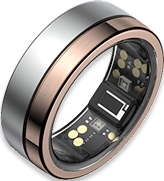
Dr.AI Ring User Guide
Thank you for choosing Dr.AI Ring.
To ensure the best possible experience, please read this guide carefully before using the ring, the companion app, or any other Dr.AI-related services. Failure to follow the instructions in this guide may result in product damage, malfunction, or personal injury.
To ensure the best possible experience, please read this guide carefully before using the ring, the companion app, or any other Dr.AI-related services. Failure to follow the instructions in this guide may result in product damage, malfunction, or personal injury.
1. Package Contents
Your package includes at least the following items:
- Dr.AI Ring × 1
- Dr.AI Ring Charging Case × 1
- USB Charging Cable × 1
2. Product Specifications
- Product Name: Dr.AI Ring
- Model: DRR01
- Finishes: Rose Twilight / Glacial Snowlight
- Ring Dimensions: Width 7.9 mm; Thickness 2.8 mm
- Ring Weight: Approx. 4–6 g
- Ring Sizes (U.S. Standard): Sizes 6–14
- Exterior Material: Titanium steel
- Interior Material: Hypoallergenic, non-metal seamless lining
- On-Device Data Storage: Approx. 1 week
- Battery: Rechargeable lithium battery (not user-replaceable)
- Battery Life: Approx. 5–7 days (varies by ring size, sleep patterns, and activity level)
- Charging Method: Dr.AI Ring charging case only
- Charging Time: Approx. 30–120 minutes
- Connectivity: Bluetooth Low Energy (BLE)
- Firmware Updates: Automatic via the Dr.AI Ring app
- App Availability: iPhone App Store and major Android app stores
- Privacy & Security: Encrypted data transmission with secure pairing between ring and app
- Water Resistance: Up to 50 m / 164 ft
- Drop Resistance: Withstands drops from 1 m / 3.3 ft or equivalent impact
- Operating Temperature: −10°C to 49°C (14°F to 120.2°F)
- Charging Temperature: 0°C to 45°C (32°F to 113°F); room temperature recommended
- Charging Case Input: USB Type-C; use a 5V / ≥1A power adapter
Power Adapter: Use BSMI-certified adapters compliant with CNS 15598-1 and related standards
3. Charging the Ring
-
1. Connect the Charging Case
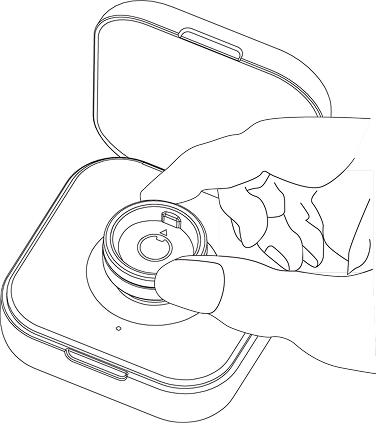
- Align the ring with the indicators inside the charging case.
- Ensure the raised sensor inside the ring aligns with the center charging contact.
- Briefly press the button on the back of the charging case to activate charging.
- Flashing green: Charging in progress
- Solid green: Fully charged
- Flashing red: Charging, but charging case battery is low
- The ring does not begin charging automatically—you must press the charging case button.
- Charge only between 0°C and 45°C (room temperature recommended).
- Use certified power adapters only.
- Avoid charging in excessively hot or cold environments.
- After firmware updates, battery readings may be temporarily inaccurate—fully recharge to recalibrate.
- Red: Below 30%
- Orange: 30%–70%
- Green: 70%–100%
- Place the ring in the charging case and press the button to start charging.
- Continue charging until 100% is displayed and for at least 60 minutes total.
- Without external power, the charging case will charge the ring to approximately 95% to preserve battery longevity.
- To reach 100%, connect the charging case to an external power source during charging.
Insert the supplied USB Type-C cable into the charging case, then connect the USB Type-A end to a compliant power source.
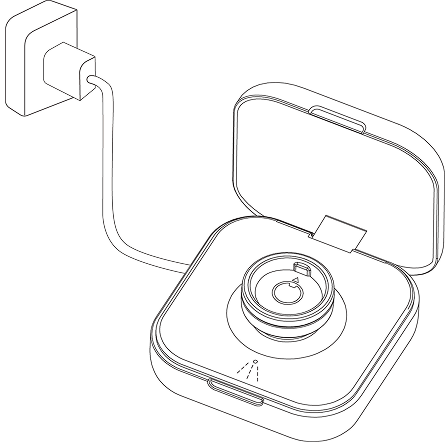
2. Place the Ring Correctly
3. Charging Indicator Lights
Press the button for approximately one second:
Important Notes
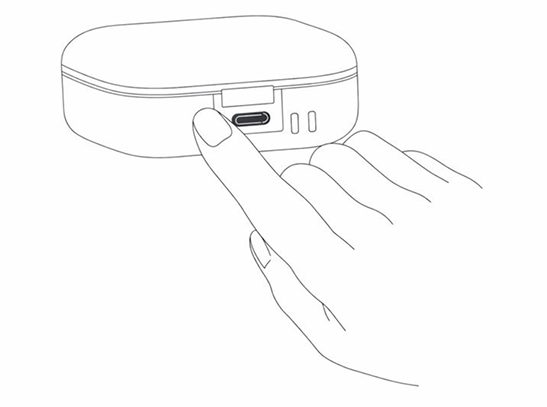
Press and hold the button for approximately two seconds:
5. Battery Calibration & Charging Time
To calibrate the battery:
Notes
4. Installing the Dr.AI Ring App
-
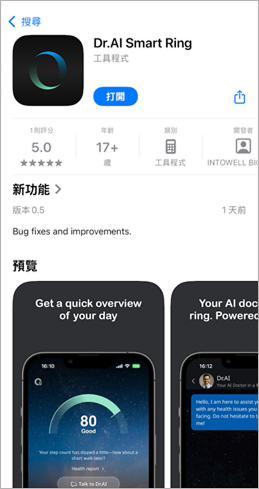
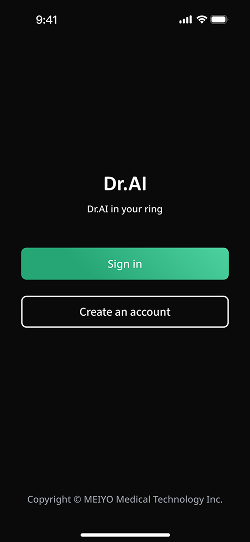
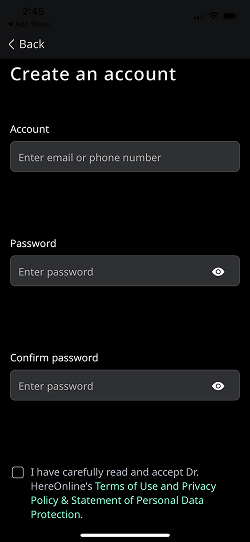
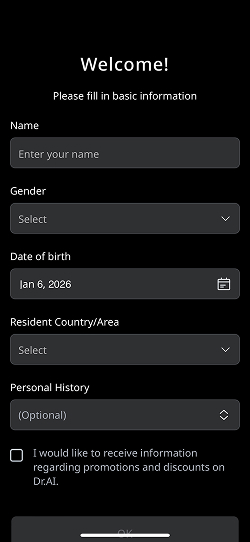
1. Search “Dr.AI Ring” in the App Store or Android app store and install the app.
5. Pairing the Ring
-
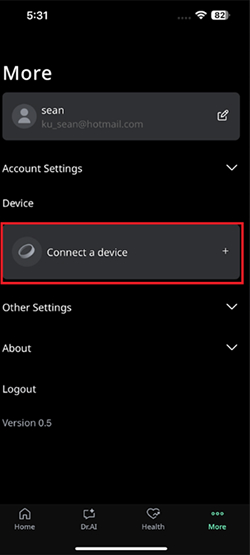
1. Place the ring in the charging case and press the button to wake it.
2. Ensure Bluetooth is enabled on your smartphone.
3. Open the Dr.AI Ring app and select the device matching your ring size and model to complete pairing.
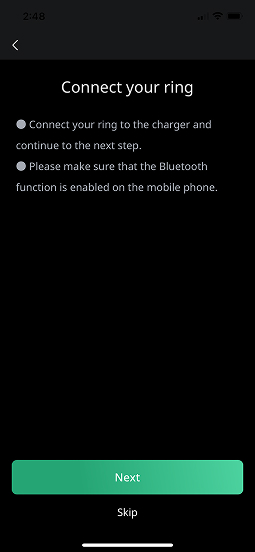
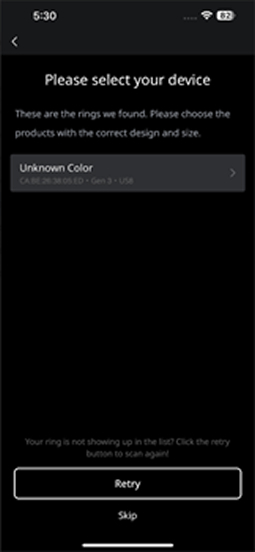
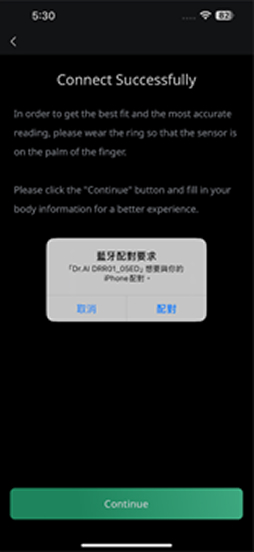
5. Place the new ring in the charging case, press the button, then select Connect a device to pair the new ring.
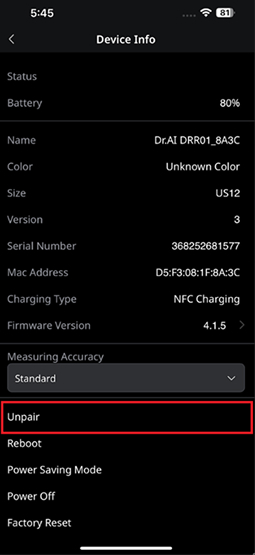
6. Wearing the Ring
Rotate the ring so the raised inner sensor rests against the finger pad.
Proper alignment improves measurement accuracy.
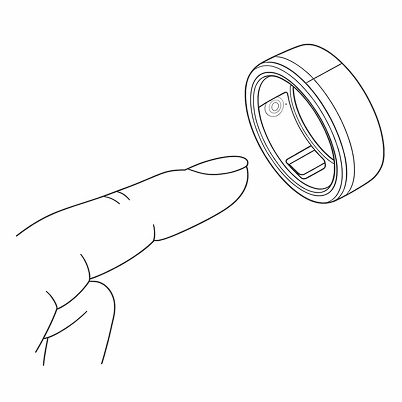
Proper alignment improves measurement accuracy.
7. Support & Assistance
For questions about setup, usage, or service issues, please visit:
Official website: https://www.draiai.com
Or email: service@draiai.com
Official website: https://www.draiai.com
Or email: service@draiai.com
8. Safety Information
Dr.AI services are not intended for the diagnosis, treatment, cure, or prevention of any disease or medical condition. All information and recommendations provided by Dr.AI are for general reference purposes only and do not replace evaluation, judgment, or treatment by qualified medical professionals.
If you have any questions regarding the health information provided by Dr.AI, or any adjustment recommendations based on your sleep or activity data, you must consult a qualified healthcare professional. Do not delay, disregard, or substitute professional medical care based on any content provided by Dr.AI.
Dr.AI assumes no responsibility or liability for any health issues that may arise as a result of using information or recommendations provided through Dr.AI-related services. If you choose to make any adjustments based on Dr.AI sleep or activity recommendations, you acknowledge and agree that you assume all associated risks.
You must carefully monitor your physical condition and responses. For example, if changes in sleep or activity patterns result in unexpected, recurring, or persistent pain, fatigue, or any form of discomfort, you are strongly advised to consult a physician before continuing or implementing further adjustments.
Additionally, if due to personal health conditions or rare physiological differences your bodily functions or responses differ significantly from general population averages, information or guidance provided by Dr.AI services may be misleading. In such cases, you must consult a qualified healthcare professional before referencing or adopting any Dr.AI-provided information or recommendations.
When lifting heavy objects or performing physical movement, ensure that the ring or any other Dr.AI Ring products are not caught, pinched, or trapped by fixed structures or heavy objects, in order to prevent injury or damage.
If your finger shows redness, itching, swelling, or other signs of skin irritation while wearing the Dr.AI Ring, remove the ring immediately. If symptoms persist after discontinuing use for 2–3 days, consult a dermatologist promptly.
If you notice that the ring becomes abnormally hot or swollen, causing finger discomfort or making removal difficult, seek immediate assistance from qualified medical personnel and contact us as soon as possible so we can further assess the product condition and advise on appropriate follow-up actions.
If you have any questions regarding the health information provided by Dr.AI, or any adjustment recommendations based on your sleep or activity data, you must consult a qualified healthcare professional. Do not delay, disregard, or substitute professional medical care based on any content provided by Dr.AI.
Dr.AI assumes no responsibility or liability for any health issues that may arise as a result of using information or recommendations provided through Dr.AI-related services. If you choose to make any adjustments based on Dr.AI sleep or activity recommendations, you acknowledge and agree that you assume all associated risks.
You must carefully monitor your physical condition and responses. For example, if changes in sleep or activity patterns result in unexpected, recurring, or persistent pain, fatigue, or any form of discomfort, you are strongly advised to consult a physician before continuing or implementing further adjustments.
Additionally, if due to personal health conditions or rare physiological differences your bodily functions or responses differ significantly from general population averages, information or guidance provided by Dr.AI services may be misleading. In such cases, you must consult a qualified healthcare professional before referencing or adopting any Dr.AI-provided information or recommendations.
When lifting heavy objects or performing physical movement, ensure that the ring or any other Dr.AI Ring products are not caught, pinched, or trapped by fixed structures or heavy objects, in order to prevent injury or damage.
If your finger shows redness, itching, swelling, or other signs of skin irritation while wearing the Dr.AI Ring, remove the ring immediately. If symptoms persist after discontinuing use for 2–3 days, consult a dermatologist promptly.
If you notice that the ring becomes abnormally hot or swollen, causing finger discomfort or making removal difficult, seek immediate assistance from qualified medical personnel and contact us as soon as possible so we can further assess the product condition and advise on appropriate follow-up actions.
9. Use, Care, and Maintenance
Finger size may fluctuate throughout the day. If the ring becomes stuck:
 Daily Care Guidelines
- Wash with cold water and mild soap while gently twisting.
- Elevate your hand above heart level before attempting removal.
- In emergencies, a professional may cut the ring from the palm side at its thinnest point.
- Clean with a soft cloth or mild soap and water.
- Suitable for showering, swimming, and scuba diving with breathing apparatus.
- Recharge at least once every three months if unused.
- Avoid contact with hard jewelry or abrasive materials.
- Remove during heavy lifting or tool use.
- Rinse immediately after contact with detergents or disinfectants.
- Avoid submersion exceeding 12 hours.
- Avoid extreme environments below −20°C or above 60°C.
- Accessories are not water- or dust-resistant.
- Do not place the ring in the mouth; not a toy.
- Keep away from prolonged heat exposure.
- Never puncture the ring or battery.
10. Disclaimer and Limited Warranty
Disclaimer
Except as expressly set forth in the Limited Ring Warranty below, the ring and all Dr.AI services are provided by IntoWell Technology Co., Ltd. (hereinafter referred to as “IntoWell”) on an “as is” basis.
IntoWell, together with its partners, suppliers, and any affiliated parties, makes no representations or warranties of any kind, whether express or implied, regarding the operation or content of the services provided through the Dr.AI Ring (including the ring device itself), or regarding any information obtained through use of the Dr.AI Ring.
IntoWell, its partners, suppliers, and affiliated entities expressly disclaim all warranties, whether express or implied, relating to the Dr.AI Ring services, including but not limited to any implied warranties of merchantability, title, fitness for a particular purpose, and non-infringement.
IntoWell does not warrant that the Dr.AI Ring services will be uninterrupted, available at any time or at any specific location, completely secure, or error-free. IntoWell further does not warrant that any defects will be corrected, or that the Dr.AI Ring services are free of viruses or other potentially harmful components.
Limited Ring Warranty
IntoWell provides the following limited warranty to the original end-user purchaser: the ring will be free from defects in materials and workmanship for a period of one (1) year from the date of purchase.
If applicable local law requires a warranty period longer than one year, the warranty period shall be extended accordingly in compliance with such laws.
During the warranty period, IntoWell will, at no charge, repair or replace any ring component that fails to meet the terms of this Limited Warranty. You are responsible for all associated shipping and transportation costs.
Replacement products may be new or refurbished, at IntoWell’s sole discretion.
This Limited Warranty does not apply to:
(i) Normal wear and tear, including scratches and dents;
(ii) Consumable components within the ring (such as the battery), unless damage results from defects in materials or workmanship;
(iii) Damage caused by failure to use the ring in accordance with instructions provided with the product or on the website;
(iv) Damage caused by accident, flooding, fire, misuse, or abuse;
(v) Damage caused by repair, modification, or alteration performed by any person not authorized by IntoWell; or
(vi) Damage resulting from use of the ring with any application or software other than the Dr.AI Ring application.
IntoWell reserves the sole and exclusive right, at its discretion, to repair the ring, replace the ring, or issue a full refund. The remedies described above constitute your sole and exclusive remedies for any breach of warranty.
Any repair or replacement performed during the warranty period shall carry a new warranty period, commencing on the date of completion of the repair or replacement, for ninety (90) days or the remainder of the original one-year warranty period, whichever is longer.
Except as expressly set forth in the Limited Ring Warranty below, the ring and all Dr.AI services are provided by IntoWell Technology Co., Ltd. (hereinafter referred to as “IntoWell”) on an “as is” basis.
IntoWell, together with its partners, suppliers, and any affiliated parties, makes no representations or warranties of any kind, whether express or implied, regarding the operation or content of the services provided through the Dr.AI Ring (including the ring device itself), or regarding any information obtained through use of the Dr.AI Ring.
IntoWell, its partners, suppliers, and affiliated entities expressly disclaim all warranties, whether express or implied, relating to the Dr.AI Ring services, including but not limited to any implied warranties of merchantability, title, fitness for a particular purpose, and non-infringement.
IntoWell does not warrant that the Dr.AI Ring services will be uninterrupted, available at any time or at any specific location, completely secure, or error-free. IntoWell further does not warrant that any defects will be corrected, or that the Dr.AI Ring services are free of viruses or other potentially harmful components.
Limited Ring Warranty
IntoWell provides the following limited warranty to the original end-user purchaser: the ring will be free from defects in materials and workmanship for a period of one (1) year from the date of purchase.
If applicable local law requires a warranty period longer than one year, the warranty period shall be extended accordingly in compliance with such laws.
During the warranty period, IntoWell will, at no charge, repair or replace any ring component that fails to meet the terms of this Limited Warranty. You are responsible for all associated shipping and transportation costs.
Replacement products may be new or refurbished, at IntoWell’s sole discretion.
This Limited Warranty does not apply to:
(i) Normal wear and tear, including scratches and dents;
(ii) Consumable components within the ring (such as the battery), unless damage results from defects in materials or workmanship;
(iii) Damage caused by failure to use the ring in accordance with instructions provided with the product or on the website;
(iv) Damage caused by accident, flooding, fire, misuse, or abuse;
(v) Damage caused by repair, modification, or alteration performed by any person not authorized by IntoWell; or
(vi) Damage resulting from use of the ring with any application or software other than the Dr.AI Ring application.
IntoWell reserves the sole and exclusive right, at its discretion, to repair the ring, replace the ring, or issue a full refund. The remedies described above constitute your sole and exclusive remedies for any breach of warranty.
Any repair or replacement performed during the warranty period shall carry a new warranty period, commencing on the date of completion of the repair or replacement, for ninety (90) days or the remainder of the original one-year warranty period, whichever is longer.
11. Limitation of Liability
Under no circumstances shall IntoWell Technology Co., Ltd., or any of its subsidiaries, be liable for any direct, indirect, incidental, punitive, or consequential damages arising out of, resulting from, or related to the use of, the inability to use, or the results of using the Dr.AI Ring services (including, but not limited to, loss of profits, loss of data, or business interruption), regardless of whether such claims are based on contract, tort, or any other legal theory, and regardless of whether IntoWell has been advised of the possibility of such damages.
IntoWell’s total aggregate liability for all claims arising out of or relating to the ring and the Dr.AI Ring services (whether the form of action or claim is based on contract, warranty, tort, strict liability, negligence, or any other legal theory) shall be limited to a maximum amount of New Taiwan Dollars (NTD) 5,000.
Some jurisdictions do not allow the exclusion or limitation of certain liabilities. In such cases, the above limitations shall apply to the maximum extent permitted by applicable law in those jurisdictions.
IntoWell’s total aggregate liability for all claims arising out of or relating to the ring and the Dr.AI Ring services (whether the form of action or claim is based on contract, warranty, tort, strict liability, negligence, or any other legal theory) shall be limited to a maximum amount of New Taiwan Dollars (NTD) 5,000.
Some jurisdictions do not allow the exclusion or limitation of certain liabilities. In such cases, the above limitations shall apply to the maximum extent permitted by applicable law in those jurisdictions.
12. Terms of Use
Your use of the Dr.AI Ring products and services is governed by and subject to our Terms of Use and Disclaimer, as well as our Privacy Policy, as set forth below:
If such Terms of Use are revised in the future, the revised terms shall be updated accordingly and shall apply to your continued use of the Dr.AI Ring products and services.
- Terms of Use and Disclaimer: Available at: https://www.draiai.com/smartring/terms_of_use
- Privacy Policy: Available at: https://www.draiai.com/smartring/privacy_policy
If such Terms of Use are revised in the future, the revised terms shall be updated accordingly and shall apply to your continued use of the Dr.AI Ring products and services.
13. Regulations and Compliance
Taiwan
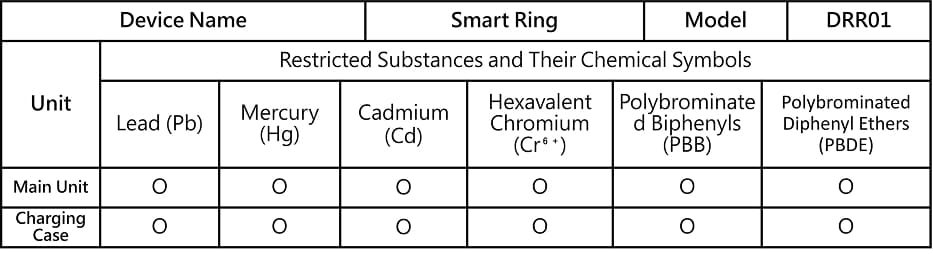
- “Exceeds 0.1 wt %” and “exceeds 0.01 wt %” indicate that the percentage content of the restricted substance exceeds the specified reference percentage threshold.
- “○” indicates that the percentage content of the restricted substance does not exceed the specified reference percentage threshold.
- “—” indicates that the restricted substance is an exempted item.
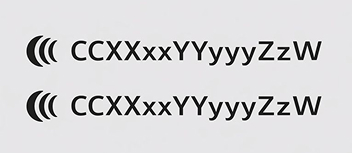
NCC Warning Statemen
Low-power radio-frequency equipment that has obtained experimental certification shall not have its frequency altered, transmission power increased, or original design characteristics or functions modified without prior approval, whether by the company, business entity, or user.
The use of low-power radio-frequency equipment must not affect aviation safety or interfere with lawful communications. If interference is detected, the equipment must be immediately discontinued and may only resume operation after the interference has been eliminated.
The term “lawful communications” refers to radio communications conducted in accordance with the Telecommunications Management Act and related regulations.
Low-power radio-frequency equipment must tolerate interference caused by lawful communications or by industrial, scientific, and medical (ISM) radio-emitting equipment.